Not Seeing Totally Target Posts on Facebook?

liked-following

I hear lots of you are unable to see my Facebook posts over the last few days. Apparently Facebook has made yet ANOTHER change as to how they choose what you see. 🙁 It’s frustrating and hard for me to keep up with being Facebook savvy- but I hear there are a few things you can do to improve your chances of seeing my posts. On the Totally Target Facebook Page (and any other pages you are not seeing posts for anymore)- you can check for the following things…

1. If you hover over the “Liked” button on the Facebook Banner and check off “Get Notifications”

2. Also when you hover over the “Liked” button choose “Show in News Feed” and then click on “settings” and then choose “All Updates”.

3. Be sure you are Following my page- by clicking on the “Follow” button next to the “Liked” button and it will now change to “Following”.

4. The more you interact with my page by liking posts, commenting or sharing them etc, the more likely my posts will show for you.

Hope this helps!

-Thanks for the tips & help to Haley, Jennifer, Heather, Roo, Tony, Michael & Karen!

Mega Swag Bucks Day Plus Bonus Signup Bucks

It’s Friday, which means Mega Swag Bucks Day where the chances of earning bigger bucks go way up today!

If you are not familiar with Swagbucks, it is a very fun and easy way to earn FREE Gift Cards and other prizes just by searching the internet. And when you register HERE for FREE– you will get 30 swagbucks just for joining! PLUS when you enter the code TOTALLYT70 (just click on “I have a sign up code) and get a bonus of 70 additional points- for a total of 100 points to get you started!

All you need to do is download their toolbar and start using it when you do your searches. Use it every time you search, and randomly you will be awarded “Swagbucks” which you can redeem for prizes. There are gift cards for Starbucks, Amazon, and more, and my most favorite – a Target e-Gift Card!:)

Usually free Swag Codes are put out several times a week worth various amounts and there are lots of other easy ways to earn bucks, including shopping, daily polls, games and referring your friends. So get signed up and start being rewarded when you search and join in on the fun hunt to get more bucks!

Reader Tips on Storing Battery-Operated Toys

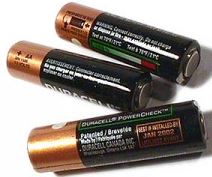
removing-batteriesWith all the Target toy clearance going on, some of you have really lucked out and have been able to gather gifts at a fraction of the cost for the upcoming Christmas holiday, Birthdays and more, I got a couple of e-mails with some good advice that I thought I would pass along.

Many of you may already do this- but Michelle wrote in a reminder that when it’s possible- it’s always a good idea to remove the batteries from toys that will be stored for an extended period of time. There’s nothing worse than discovering a toy doesn’t work and the culprit is corroded batteries- so better safe than sorry.

I also got this same mention about removing batteries from Tish- who also had a suggestion if you have ever discovered a corroded battery compartment… “while sometimes it’s a lost cause- when it is not that bad- I have found that I have been able to use a little witch hazel or rubbing alcohol on a Q-tip to clean out the compartment and get things working again. It’s worth a try anyway since these products are pretty inexpensive and something most people would have in the house already.”

-Thanks for your e-mails & suggestions to Michelle & Tish!

Target Cartwheel: A New Way to Save Even More!

cartwheelTarget has an awesome savings program called Cartwheel by Target which offers additional opportunities to save even more! You can get as much as an additional 50% off, occasionally even higher, on items at Target including grocery, health & beauty, baby, clothing and much more. The best part is that you can combine Cartwheel offers with your coupons! You are allowed one Cartwheel offer with one manufacturer’s coupon and one Target coupon, triple the savings!

Cartwheel can be accessed 2 ways. You can access Cartwheel from a computer, browse and add offers and then print out your barcode to use in store. Or… Cartwheel can be accessed in the Target App on mobile Devices. This will allow many other features of the App to be utilized like scanning barcodes on items to see if there are any cartwheel offers and more.

To get started from your desktop, just go HERE, or just download the Target app from Google Play or iTunes and create an account. Then, log in to your account and you’re ready to start saving!

example

Now simply browse thru the offers on the desktop or your phone and hit the plus sign to add anything that interests you. When you’re ready to purchase your items and your offers are in your cartwheel, you can either print your Cartwheel barcode from your desktop at home and bring it with you to the store, or you can pull up your Cartwheel your mobile device.

To print your barcode, just go to www.cartwheel.target.com and login, then click on “Checkout” on the left, and then select ‘Print my Barcode’ at the top of the screen. This barcode is always the same, no matter what you add or remove from your list. So you could always laminate your barcode to be able to use it again and again at checkout.

To check out with Cartwheel with your mobile device, just open up the Target app and tap on the wallet icon to bring up the barcode for your cashier to scan.

Here are a few more points to keep in mind when using Cartwheel offers…

  • The Cartwheel discount is taken AFTER Target Coupons and BEFORE manufacturer coupons.
  • An IDENTICAL Offer can be applied a maximum of FOUR times in a single Transaction.
  • You can save on your entire Cartwheel list up to 6 times per day.
  • If you would like to make sure an item qualifies for a cartwheel offer before you buy it, you can use the barcode feature in the app. Just tap on the barcode icon at the top of the main menu and scan your item. If there is a matching offer, it will come up and automatically be added to your list.


My Pineapple in Progress – Still Growing Strong…

pineapple-8-weeks

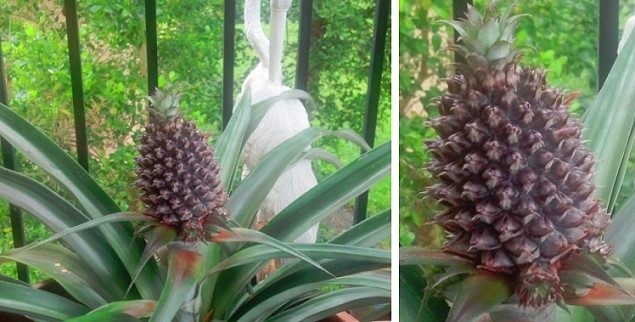
For those of you who have seen my earlier Pineapple posts- just reporting in that it’s doing great! In about 8 weeks, it’s grown from the little bud I posted about HERE, to the size of I would say a large grapefruit, (and much bigger than my little frog friend ;)). Growing this pineapple has been a big feat for me, as usually nothing I plant survives, so it’s very exciting and I hope it keeps growing!

It’s starting to lean a little bit, so I am hoping the stalk can support it as it grows. I can’t wait until we can actually pluck it off and eat it, and I think I will cut the top off it and grow yet another plant! 🙂